 SmartLockPro
Case Study: 7 Smart Locks for a Room-by-Room Rental
Most smart lock jobs are one door. This one was seven — a front door plus six bedrooms, each room let out separately to a different guest on different dates. Here's how it was planned, fitted and configured, and what made it harder than a standard install.
The property
RoomKeyPin (roomkeypin.com) runs a vacation rental where each bedroom is booked individually rather than the whole house going to one party. That single fact changes everything about the access design.
In a whole-property let, one guest arrives, one code works everywhere, and it all expires on checkout day. Here, six guests can be in the building at once, none of them knowing each other, each arriving and leaving on their own schedule. Every guest needs to get through the front door — but only into their own room.
What was installed
Seven TTLock-platform smart locks in total:
- 1 × front door. The shared entrance, used by every guest in the building plus the cleaning team.
- 6 × bedroom doors. One per lettable room, each with its own completely separate set of credentials.
Every lock supports PIN, fingerprint, key card and mechanical key override, with remote management over a gateway. See the full breakdown of access methods for what each one is best used for.
The challenges
None of these are dealbreakers, but all four are things that go wrong on a multi-lock job if nobody plans for them up front.
1. Two-tier access on every single booking. A guest in Room 4 needs two credentials, not one: the front door and their own room. Get that wrong in either direction and you have a real problem — too little access and someone is locked out on the pavement at midnight; too much and a guest can walk into a stranger's bedroom. Each booking is therefore provisioned as a pair of codes with matching validity windows, and the bedroom codes are scoped so they only ever work on one door.
2. Gateway coverage across a whole building. These locks talk to the outside world over Bluetooth via a gateway, and Bluetooth does not travel well through a house — the practical range is roughly 10 to 15 metres and every wall and floor eats into it. Seven locks spread over multiple floors will not all reach one gateway sitting by the router. The locks were surveyed for signal and gateway placement chosen around actual coverage rather than convenience, so that every lock can be managed remotely — otherwise a “remote” system quietly becomes one you have to walk to the door to change.
3. Six independent booking cycles. Rooms turn over on their own dates, so at any given moment the building has six different code lifecycles running in parallel. Doing that by hand is where mistakes creep in — a code left live after checkout, or a new guest arriving before theirs is issued. So it isn't done by hand: codes are driven from the booking itself (see below).
4. Seven sets of batteries. One lock is easy to keep an eye on. Seven means the odds of one of them being low at any given time are seven times higher, and a flat lock on a bedroom door on a changeover day is a bad afternoon for everyone. Battery levels report back through the gateway, so they're monitored centrally instead of discovered by a guest. The mechanical key override is the backstop.
How guests actually get in
RoomKeyPin manages its bookings on tioo.com, a short-let property management platform that integrates directly with the TTLock system. That integration is what makes a seven-lock, six-schedule property practical to run rather than a full-time job.
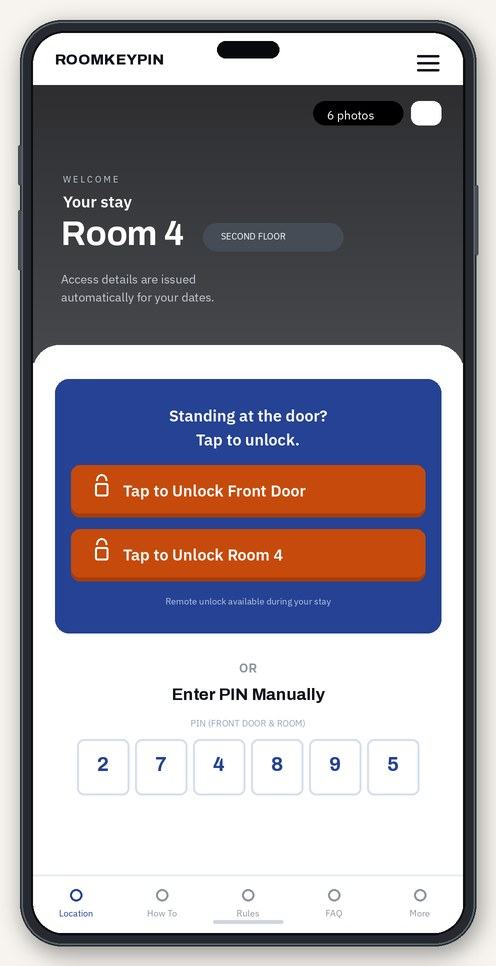
Because the locks and the bookings live in the same system, the guest doesn't install a lock app, doesn't create an account with the lock manufacturer, and doesn't get a code emailed over separately. They open their booking and their access is simply there — a button for the front door, a button for their room, and the PIN as a fallback if their phone has no signal at the door. Access appears when their stay starts and stops working when it ends, without anybody remembering to revoke it.
Full disclosure: tioo.com was built by SmartLockPro's founder, which is exactly why we know this integration inside out — see about us.
The result
Six rooms and a front door that let themselves in and out of use on schedule. No key handovers, no lockbox on the wall, no meeting guests at inconvenient hours, and no keys in circulation that somebody might have copied. When a guest checks out, their access ends — including the front door — without anyone having to do anything about it.
Running a room-by-room let, an HMO, or a portfolio with more than one door? Tell us about the property and we'll work out what it needs.
Questions
Frequently asked
Yes. Each lock is managed independently, so a code, card or fingerprint that works on one bedroom door has no effect on any of the others. Shared doors like the main entrance are handled separately, so a guest gets into the building and into their own room only.
No. The locks work perfectly well on the standard TTLock app, where you create and expire codes yourself. The tioo.com integration is what removes the manual step by tying access to the booking — most useful once you're managing several rooms or properties with frequent turnover.
The locks are battery-powered and run independently of your mains and broadband. PIN codes, fingerprints, key cards and the mechanical key all keep working with no internet at all — you just lose remote management until it's back.
Seven on this job, but that isn't a ceiling — the platform handles far more, and additional gateways extend coverage through a larger building. The practical limits are signal coverage and budget, both of which we assess before quoting.
- Speed
- Same-day installationSubject to availability in your area
- Pricing
- Fixed-price quotesAgreed before we start, no callout fee
- Guarantee
- 12-month workmanshipWe come back and fix it, no charge
- Coverage
- Northwest, and UK-wideDay-to-day in the Northwest; further for larger jobs — see coverage
Get a fixed price for your door
Tell us the property and we'll quote it — no callout fee, no obligation.